AI Agent Access for Security Cameras: How MCP Connects Your Camera to AI Tools
April 9, 2026
Oriel exposes camera status, snapshots, and detection events through a local MCP server. An MCP-compatible AI client can use those read-only tools. The camera connection stays on your local network; where a snapshot goes afterward depends on the AI client you choose.
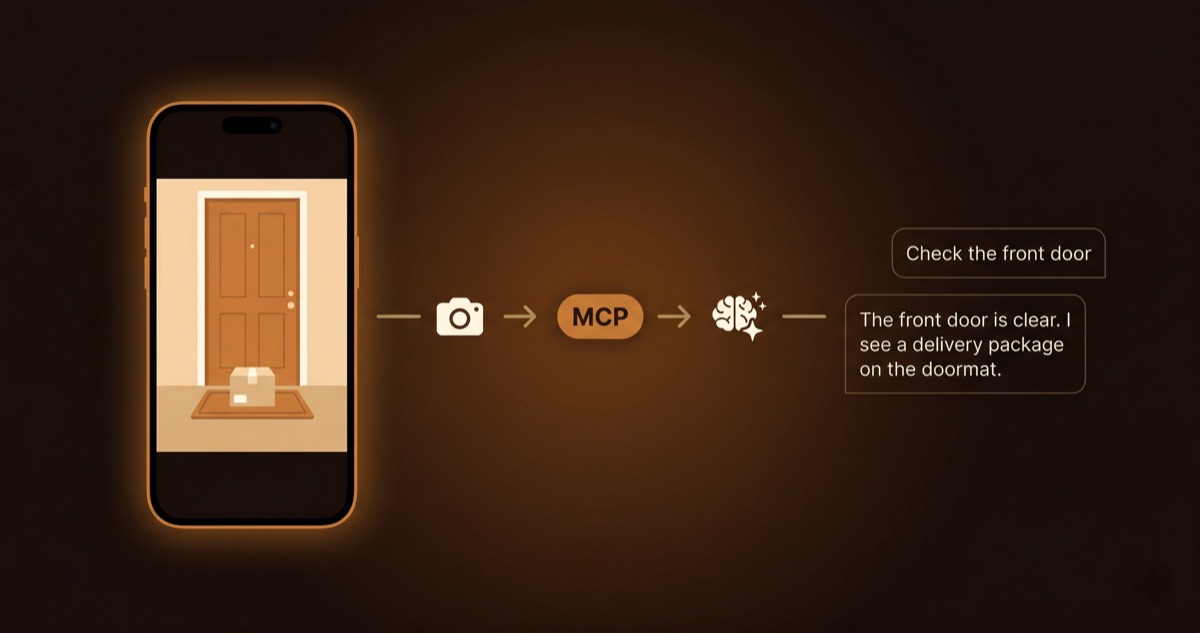
What This Means in Practice
You're working at your desk. Instead of picking up your phone, opening an app, and checking the camera yourself, you type:
"Check the front door camera."
Your AI agent calls the camera, receives a snapshot, and tells you what it sees. A closed door, a package on the mat, a person at the gate. The agent uses its built-in vision capabilities to interpret the image, then reports back in plain language.
Use a client that supports local MCP tools, such as Claude Code or Claude Desktop. Check the client’s current MCP features before setting it up.
How It Works
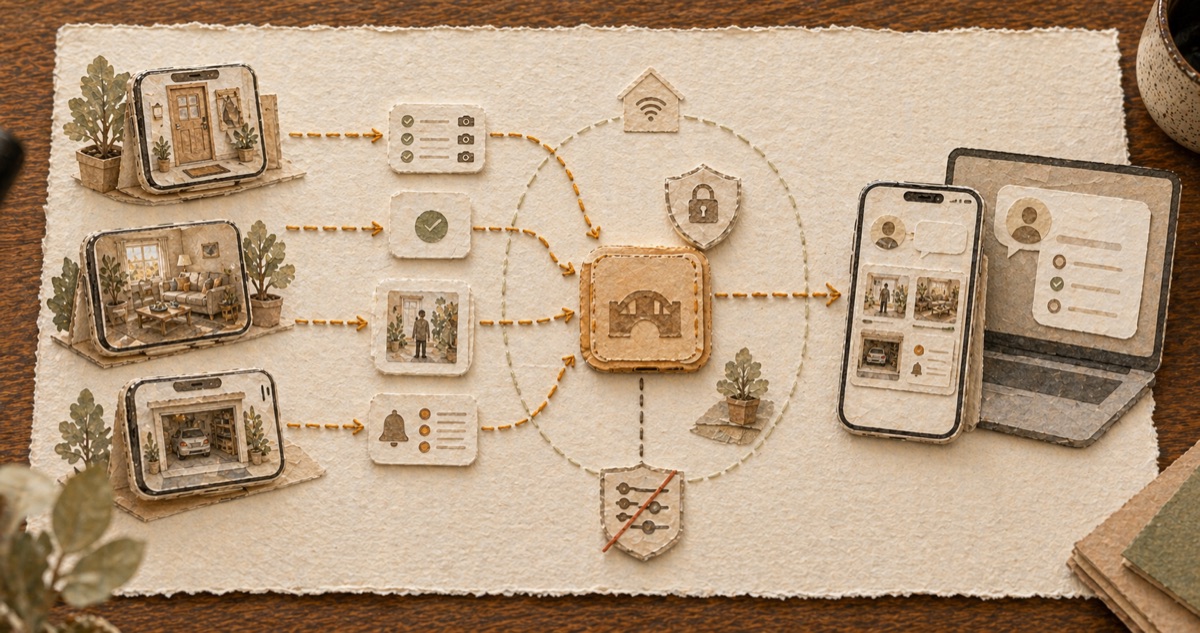
Oriel's camera device runs a small HTTP server on your local network. An MCP server bridges the gap between that HTTP server and your AI agent.
iPhone (Camera) <── Local Network ──> MCP Server <── MCP ──> AI AgentThe AI agent never connects to the camera directly. It calls MCP tools, and the MCP server handles the rest. Four tools cover the full API:
| Tool | What it does |
|---|---|
list_cameras |
Find all Oriel cameras on your network |
get_status |
Check if a camera is online and for how long |
get_snapshot |
Get a live JPEG from the camera |
get_events |
Review recent motion and person detection events |
All read-only. The agent can observe but cannot control the camera, change settings, or access recordings.
Connect the MCP server
- Open Oriel on your camera device. In camera mode, the app shows an API token.
- Copy the token.
- Add the MCP server to your agent's config:
{
  "mcpServers": {
    "oriel-camera": {
      "command": "node",
      "args": ["/path/to/mcp-server/index.js"],
      "env": { "ORIEL_TOKEN": "your-token-from-step-1" }
    }
  }
}
The MCP server discovers cameras on the local network with Bonjour. Add the camera token to your client configuration.
Where snapshots go
The camera’s HTTP server accepts connections from the local network. Its MCP tools can read status, snapshots, and events; they cannot change camera settings or access recordings.
The MCP bridge does not upload snapshots on its own. If your AI client sends images to a cloud model, that provider may receive them. Check the client’s data policy before granting camera access.
- Keep the API token private. Restart the camera to revoke it.
- Use a client that processes images locally if snapshots must stay on your devices.
What AI Agents Can Do With Camera Access
Home check-ins. Ask your agent to check a specific camera while you're working. Get a description of what it sees without switching apps.
Event summaries. "What happened on the front door camera in the last hour?" The agent pulls detection events and summarizes activity patterns.
Multi-camera overview. "Are all cameras online?" The agent checks each camera's status and reports which ones are running, how long they've been active, and if any went offline.
Automated monitoring. Developers can build agents that periodically check cameras and alert on specific conditions, like a door left open after midnight.
Why MCP
Model Context Protocol is an open standard supported by Anthropic, and adopted by a growing number of AI tools. Building on MCP means:
- Works with clients that support local MCP tools
- No custom integration code for each AI platform
- Tools are self-describing. Agents read the tool definitions and figure out how to use them.
- The open-source MCP server can be extended by anyone
MCP exposes the same camera tools to each compatible client.
Open Source
The MCP server and Claude Code plugin are open source on GitHub:
OrielCamera/oriel-camera-skill
Install it in Claude Code with one command. Contributions welcome: new tools, better discovery, multi-camera workflows.
FAQ
Which AI agents are supported?
Any agent that supports Model Context Protocol (MCP). This includes Claude Code, Claude Desktop, and a growing number of third-party tools. Check whether your AI client supports local MCP tools.
Can the AI agent control my camera?
No. All MCP tools are read-only. The agent can view snapshots and events but cannot change camera settings, start/stop recording, or access stored recordings.
Does this work remotely?
The MCP connection requires the agent and camera to be on the same local network. This is a deliberate design choice for privacy. Remote access through a VPN on the same network works.
Is the MCP server always running?
The MCP server runs on your computer when your AI agent needs it. The camera's HTTP server runs whenever the camera is active in Oriel.
What data does the AI agent receive?
JPEG snapshots (640x360), camera status (name, uptime, mode), and detection event metadata (type, timestamp). No audio. No continuous video stream.
* Oriel uses WebRTC to establish direct encrypted connections between devices. In some network environments, the connection may be relayed through an encrypted TURN server. The MCP layer operates independently on the local network and does not use WebRTC.